
WordPress plugins are very useful. You can easily install a plugin from the WordPress dashboard.
1. Log in to the WordPress dashboard.
2. From the Dashboard menu, go to Plugins and click on Add New.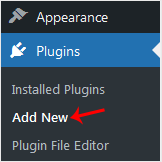
3. Use the Search filter to find the plugins. Type Security to find plugins related to it.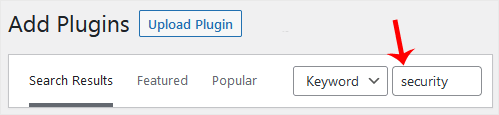
4. The available plugins matching the keyword Security will appear. Click on Install Now, next to the plugin's name.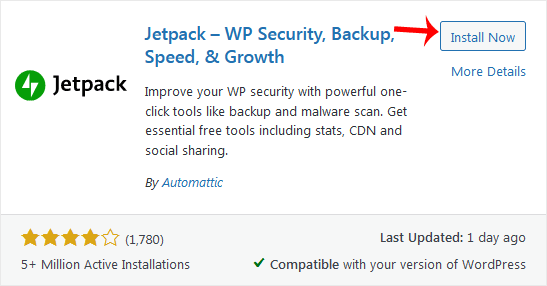
5. The installation can take a few moments. Once the Activate option appears, choose it.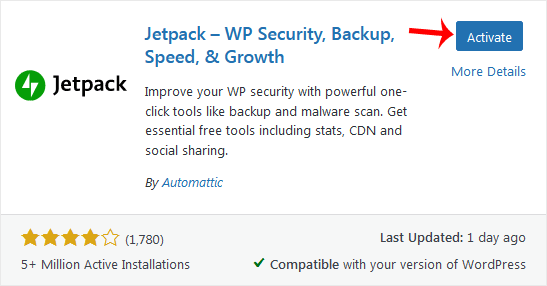
Note: After activating a plugin, a new menu of that plugin will be added to the Dashboard menu. If a plugin requires a setup, it will display an option to complete it.
Més Popular
How to Access the WordPress Admin Dashboard
WordPress is an easy to work with CMS software. To access a WordPress account, please follow...
How to Remove Sample Comments and Posts From WordPress
You get sample comments and posts in a fresh WordPress install. You can easily remove them in the...
How to Write and Publish Your First Blog Post in WordPress
Writing your first blog post is a fascinating thing. Follow the steps below to do so in...
How to Remove a Post in WordPress
You can remove the published or draft post in WordPress.1. Log in to the WordPress dashboard. 2....
How to Bulk Delete Posts in WordPress
It is possible to delete posts in bulk using WordPress. You can also delete selected posts in...


