
• 0 Winkelwagen
  • Rekening
    • Aanmelden
    • Registreren
    • Wachtwoord vergeten?
Custom Logo
  • Startpagina
  • Winkel
    • Blader door alles
    • Cpanel Hosting
    • E-mail Hosting
    • Domeinnaam registreren
    • Domeinnaam verhuizen
    • -----
    • WP-toolkit
  • Aankondigingen
  • Kennisbank
  • Netwerk status
  • Neem contact op met ons
  • Meer

Kennisbank

  1. Klantensysteem Home
  2. Kennisbank
  3. WordPress
  4. How to Remove a Post in WordPress

  Categorieën

Backup/Restore
4
Cloudflare (cPanel)
9
CloudLinux (cPanel)
10
cPanel - Control Panel
24
Databases
11
DNS - Nameservers
6
Domain Management
10
Email
17
FTP
9
Mail Filters & SPAM
6
Mobile
11
Others
3
Security
10
Softaculous
69
SSL
5
WordPress
17

  Categorieën

  Tag-cloud

backup restore

  Ondersteuning

Mijn Support Tickets
Aankondigingen
Kennisbank
Downloads
Netwerk status
Maak een helpticket aan

How to Remove a Post in WordPress Afdrukken

  • 0

You can remove the published or draft post in WordPress.


1. Log in to the WordPress dashboard.


2. From the Dashboard menu, go to Posts and click on All Posts.
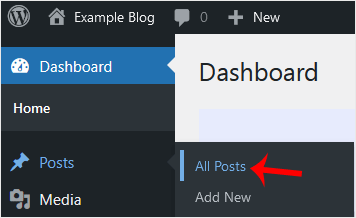
wp-first-time-all-post.gif


3. Hover your mouse to the post you want to remove, and click on Trash.
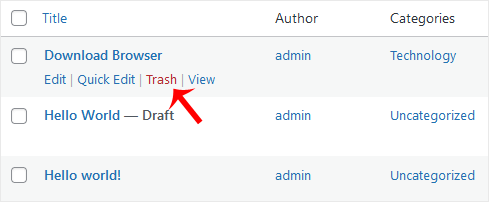
wp-removing-selected-post.gif


You will get a message that the post has been moved to Trash.


Was dit antwoord nuttig?

Gerelateerde artikelen

How to Access the WordPress Admin Dashboard WordPress is an easy to work with CMS software. To access a WordPress account, please follow... How to Remove Sample Comments and Posts From WordPress You get sample comments and posts in a fresh WordPress install. You can easily remove them in the... How to Write and Publish Your First Blog Post in WordPress Writing your first blog post is a fascinating thing. Follow the steps below to do so in... How to Bulk Delete Posts in WordPress It is possible to delete posts in bulk using WordPress. You can also delete selected posts in... How to Add a New Category in WordPress WordPress categories are handy for you to organize posts. You can create categories and...
« Terug

  Tag-cloud

backup restore

  Ondersteuning

Mijn Support Tickets
Aankondigingen
Kennisbank
Downloads
Netwerk status
Maak een helpticket aan

Bouw jouw website met Sitejet Builder

Sitejet Builder maakt webdesign simpel: kies een template, sleep onderdelen op hun plek en publiceer meteen vanuit cPanel zonder gedoe met installaties.

Start nu

Lage prijzen voor domein & hosting in Nederland. Helder, eerlijk en zonder verrassingen.

Menu

  • Home
  • Over Ons
  • Hosting
  • Domein
  • E-mail
  • Contact

Info

  • Blogs

Contact

  • +31 6 17111181
  • support@flyhosting.nl

  • KVK: 83608435
  • BTW: NL003852287B06
  • Prijzen zijn excl. btw tenzij expliciet anders aangegeven.
    • Neem contact op met ons

    Copyright © 2026 FLY Hosting. Alle rechten voorbehouden.


    Laden...
    Laden...
    Taal selecteren
    العربية
    Azerbaijani
    Català
    中文
    Hrvatski
    Čeština
    Dansk
    Nederlands
    English
    Estonian
    Persian
    Français
    Deutsch
    עברית
    Magyar
    Italiano
    Macedonian
    Norwegian
    Português
    Português
    Română
    Русский
    Español
    Svenska
    Türkçe
    Українська

    Valuta selecteren

    € EUR
    $ USD
    £ GBP

    Genereer wachtwoord

    Voer een wachtwoord in dat uit 8 tot maximaal 64 tekens bestaat.